Random squares, right on every dancer’s phone.
No scan cards. No scanners. No software. No apps to download. Everything runs in a browser window, and it’s completely free.
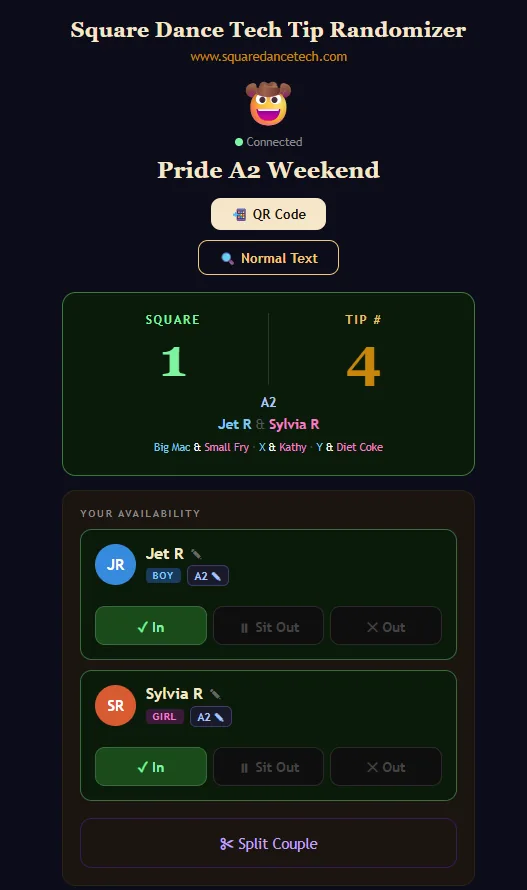
Dancers get their square assignments on their phones. No need for dozens of people to gather around a tiny monitor to see where they’re dancing.
The moderator part is designed for a laptop, but in field testing it has proven easy to use on a tablet, or even just a phone. (Personally, I wouldn’t moderate an event with more than three squares on a phone, but it is doable.)
A shout-out to Ri-Shea Schlitter for her invaluable help field testing the software. Her recommendations were insightful and made this a far better product. Thank you, Ri!
Everything from their own phone.
Sign in themselves and a partner
Couples choose who dances which position; a solo dancer can choose boy, girl, or either.
Pick their highest level
Student, Mainstream, Plus, A1, A2 or a challenge level. At a mixed-level event, when the moderator picks a C1 star tip, anyone below C1 is left out automatically. Nobody signs out and back in.
In, out, or sit one out
Dancers mark themselves in or out, or sit out a single tip and be put back in automatically for the next one.
Partners can split
If one partner sits out, the other can switch to boy or either, and switches back automatically when the partner returns. Couples can also split for good (handy for angels at classes).
No phone? No problem.
The moderator can add dancers by hand, and a display screen shows every dancer’s square assignment, up to 100 dancers, listed by name.
Completely free
It won’t cost you, your club, event or organization anything.
A few honest caveats.
You will need an internet connection, and the dancers will need to connect too: all of the data lives online. If you’re dancing in the middle of a desert you probably won’t have a connection. But at almost every dance venue in the United States, dancers can use their phones and the moderator can hot-spot a laptop.
Evaluate your audience. In real-world tests, some dancers didn’t know what a browser was, had never seen a QR code, or didn’t know how to scan one. Tape several QR codes in strategic spots around the hall, and take a minute to teach dancers how to scan them. They may end up with 15 open browser windows, but they’ll see their assignments.
Click to download.
Let me set up your club, event or organization.
Fill out the form and I’ll set you up so you can play with the software. Choose a four-digit PIN: it’s what you’ll use to log in as the moderator.